CSV import, validation, and review
Batch Transaction Processor
Upload a CSV, see which rows are wrong and why, then confirm only the valid ones. Tested with files up to 10,000 rows.
- Role
- Product engineering
- Scope
- Runs in the browser
- Year
- 2025
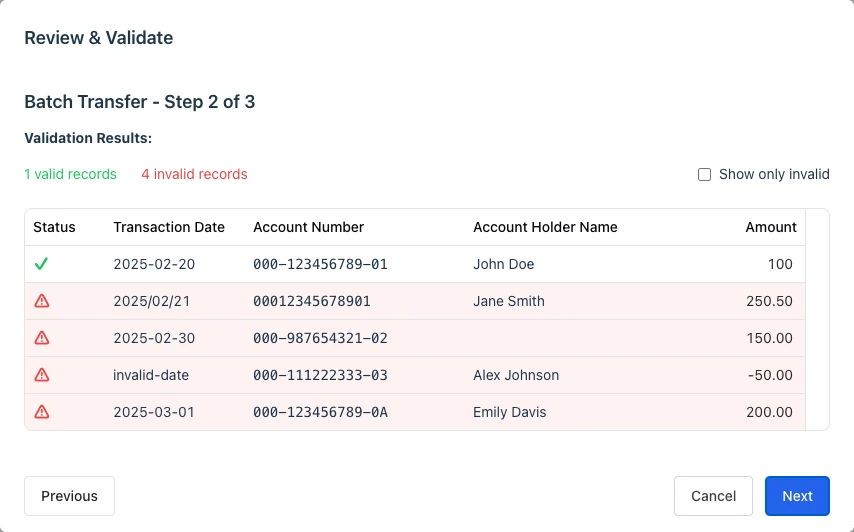
Why I built it
Bulk imports rarely fail in one clean way. Headers change, dates are malformed, amounts fall outside the allowed range, and one invalid row can make a useful file hard to review. The screen needed to show those problems before confirmation without burying them in a long error list.
How the review works
The flow has three steps: enter the batch details, parse and review the file, then summarize only the records that are valid for submission. Zod handles row validation, while the review screen shows each error where it can be corrected.
Strict mode accepts only the expected column names. An optional permissive mode recognizes a small list of documented alternatives. The default never guesses what a column means.
Choices in the code
- Parsing and validation are separate, so the normalization rules can be tested without rendering the interface.
- Going back keeps the selected file and parsed records instead of making the user repeat the import.
- The current page is kept in the URL and browser storage, which makes a long review easier to resume.
- Above 300 rows, the review table uses virtualization to keep large synthetic imports responsive.
What the tests cover
The repository includes unit, component, and Playwright coverage for valid and invalid files, header mismatches, returning to an earlier step, pagination, mixed validity batches, and synthetic files with 10,000 rows. The fixtures use generated names, account numbers, dates, and amounts.
Scope
Browser workflow with synthetic data and in memory confirmation; payment processing, backend persistence, and a hosted demo are outside its scope.